
How Kalkut's Convenience Store Enforces 8:30am–8:30pm Trading Hours on Shopify
Kalkut's Convenience Store, a 500+ SKU Doncaster, UK shop selling alcohol, fresh food, and multi-vendor goods, uses OrderRules to block Shopify checkout outside 8:30am–8:30pm — eliminating after-hours orders, perishable spoilage, and UK alcohol-licensing exposure across iOS, Android, and web.

At a glance
- Customer
- Kalkut's Convenience Store
- Location
- Doncaster, South Yorkshire, UK
- Industry
- Convenience & grocery (multi-vendor)
- Platform
- Shopify (web + iOS + Android apps)
- Catalog size
- 500+ SKUs across 25 categories
- Trading hours
- 8:30am–8:30pm, 7 days/week
- OrderRules features used
- Weekly Schedule, custom closed message, timezone, multi-day rules
- Headline outcome
- 0 after-hours orders since OrderRules went live
Why did Kalkut's need order-hours enforcement?
Kalkut's needed checkout blocked outside 8:30am–8:30pm because the shop is a physical convenience store, not a 24/7 e-commerce operation. With 500+ SKUs across alcohol, fresh food, and a multi-vendor local marketplace featuring Clarkes Butchers, Curry by Chris, Death by Fudge, and Officially Roasts, every order requires a staff member in the shop to pick, pack, and deliver locally around Doncaster.
Three operational pressures made hour enforcement essential rather than nice-to-have. First, UK alcohol-licensing exposure — the Licensing Act 2003 and the Sunday Trading Act constrain when alcohol can be sold, so any after-hours alcohol order is a compliance problem, not just a logistics one. Second, perishable spoilage — fresh meat from Clarkes Butchers, dairy, and produce cannot sit in a queue overnight waiting for the shop to open. Third, customer experience parity across surfaces — Kalkut's sells through the web storefront on kalkuts.co.uk and through dedicated iOS and Android apps, and the trading window has to apply equally on all three.
A storefront banner saying "we're currently closed" was not enough — Shop Pay, Apple Pay, Google Pay, and direct checkout URLs all bypass theme-level cart scripts. The block had to live at the checkout validation layer or it would not apply consistently. (Read the longer explainer in display vs enforcement on Shopify.)
How OrderRules solves it
OrderRules runs as a Shopify Function attached to Checkout Validation. Every order, on every surface, is validated server-side against the trading window before Shopify will accept payment. Here is the exact configuration powering Kalkut's — every feature used, with links to the underlying documentation.
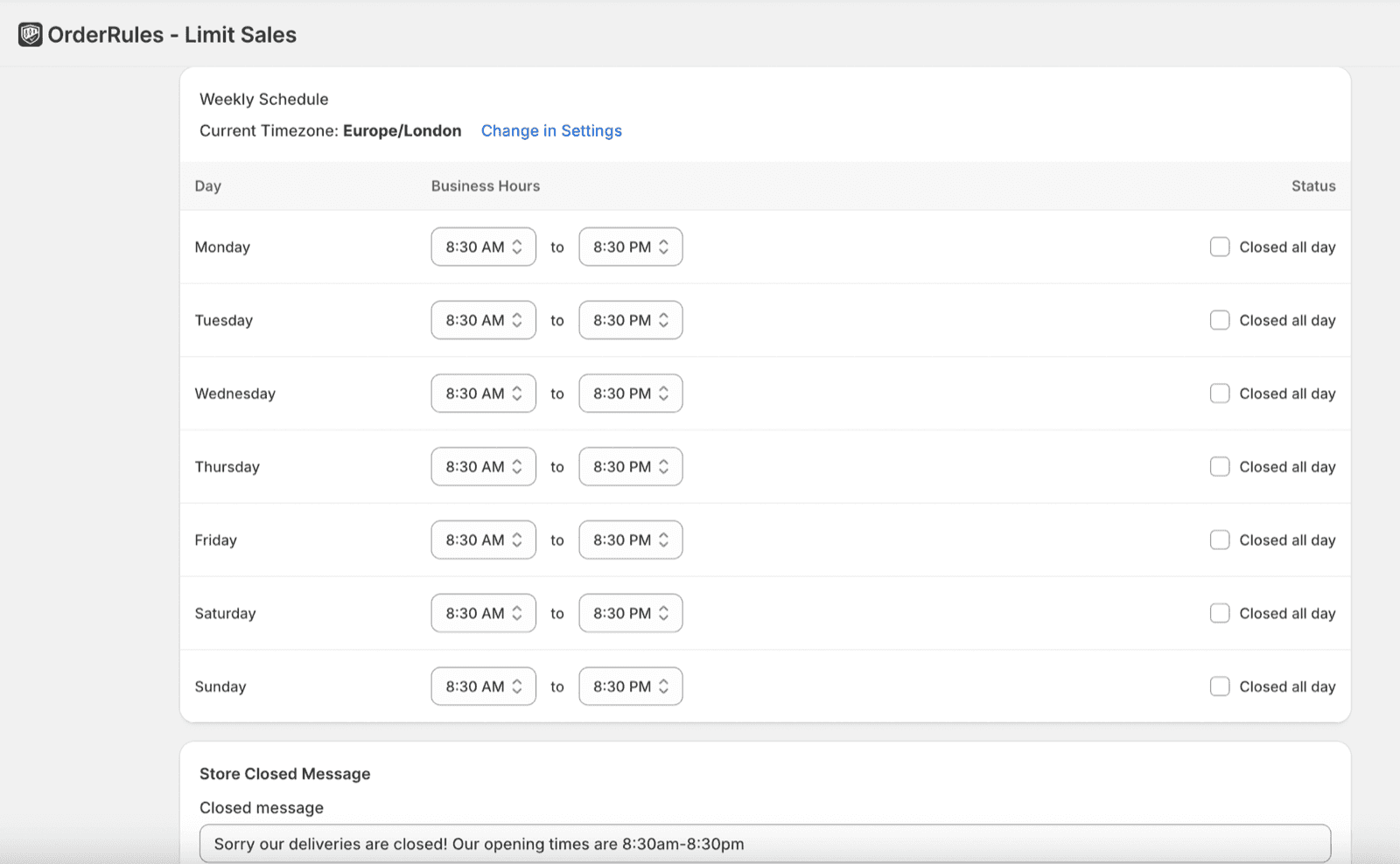
The OrderRules Weekly Schedule for Kalkut's — Europe/London timezone, Mon–Sun 8:30am–8:30pm, with the live closed-state message customers see at checkout.
Weekly Schedule (8:30am–8:30pm, seven days)
Per-day open/close times configured once in OrderRules, applied at checkout via Shopify Functions. Same configuration covers Monday–Sunday with the 'Closed all day' toggle reserved for bank holidays and emergency closures.
Read the store-hours setup guideEurope/London timezone (DST-safe)
OrderRules stores the trading window in the store's selected timezone, so the British Summer Time / GMT transitions every March and October are handled automatically. No manual schedule changes needed.
Read about automated store hoursCustom closed-state message
Kalkut's shows the text "Sorry our deliveries are closed! Our opening times are 8:30am–8:30pm" inside the checkout block, so customers always see the exact trading window — not a generic "closed" string.
Read display vs enforcementCheckout enforcement (not theme banner)
OrderRules runs as a Shopify Function attached to Checkout Validation. Shop Pay, Apple Pay, Google Pay, and direct checkout URLs are all covered — display-only banners cannot block any of those payment paths.
See all OrderRules featuresOne-click UK holiday calendar (available, on standby)
OrderRules ships a 1-click UK holiday import so Christmas Day, Boxing Day, Easter, and bank holidays can be added to the schedule without manual date entry. Kept available for Kalkut's seasonal closures.
Read the holiday calendar guideImplementation timeline
OrderRules is a no-code, single-install Shopify app, so setup for Kalkut's took minutes rather than days. The full sequence from install to live enforcement:
- 1
Install OrderRules from the Shopify App Store
One-click install. No theme edits, no API keys, no developer required. App permissions limited to what Shopify Functions needs to read the cart at checkout.
- 2
Set timezone to Europe/London
The single most important setup step — wrong timezone is the most common cause of orders slipping through outside hours.
- 3
Configure 8:30am–8:30pm for Monday through Sunday
Identical hours across the week, no "Closed all day" toggles. Open and close times are set once and apply forever; daylight saving is handled automatically by the Europe/London timezone.
- 4
Write the closed-state message
Custom message reads: "Sorry our deliveries are closed! Our opening times are 8:30am–8:30pm". Customers see the real trading window, not a generic string.
- 5
Verify with a test order outside hours
Draft order placed at midnight confirms Shopify Functions block the checkout before payment is captured. Same behaviour verified on the iOS and Android apps.
Results — before and after OrderRules
The point of enforcing trading hours is that the system has to do work the storefront banner cannot. Below is what changed at Kalkut's once OrderRules was live.
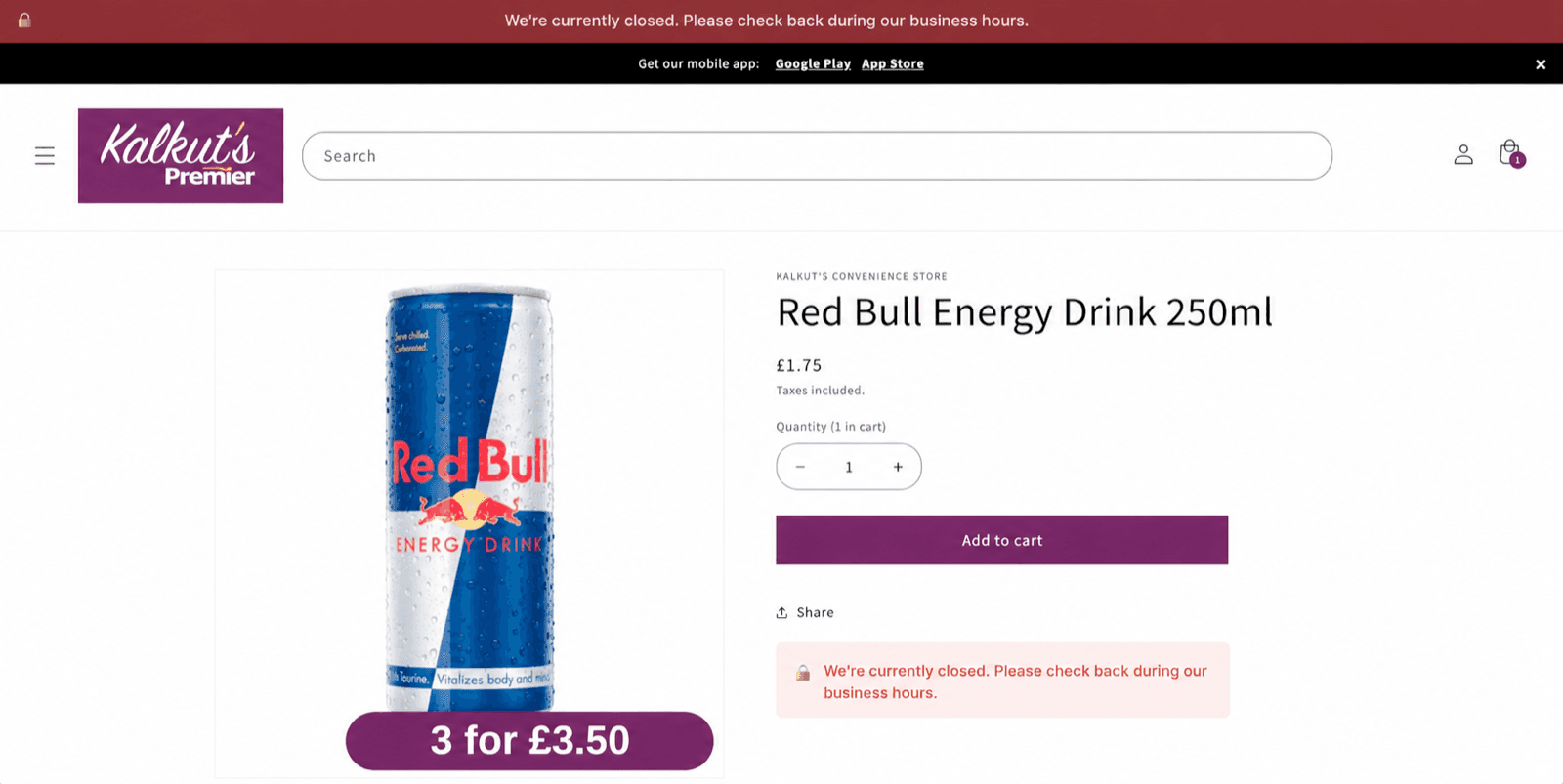
Kalkut's live storefront during closed hours — both the page banner and the inline product-page message are powered by OrderRules' checkout block.
| Operational metric | Before OrderRules | After OrderRules |
|---|---|---|
| Orders received outside trading hours | Daily — overnight orders for next-day delivery | 0 — checkout blocked by Shopify Functions |
| Customer-facing closed-state UX | Theme-only banner, easy to ignore | "We're currently closed" banner + checkout block + custom message |
| UK alcohol-licensing exposure on Shopify | No hour-based gate at checkout for alcohol products | Trading-hours window enforced for entire cart, including alcohol |
| Perishable spoilage from un-fulfillable orders | Fresh produce, dairy, and butcher orders placed for closed hours | Orders only accepted when staff is in the shop to pick + deliver |
| Time staff spent issuing refunds for off-hours orders | Recurring weekly task | Eliminated |
| Coverage of iOS + Android storefront apps | Mobile app could complete checkout outside hours | Same Shopify Functions enforcement applies on web and both apps |
“We needed something that actually stops orders after 8:30pm, not just shows a message. OrderRules does exactly that.”
Frequently asked questions
No. Shopify has no native way to display, schedule, or enforce business hours. Any of these capabilities requires a Shopify app. Display-only widgets render hours on the storefront but cannot block checkout. Apps that enforce hours at checkout — OrderRules and We Are Open — use Shopify Functions to validate every order server-side, so Shop Pay, Apple Pay, Google Pay, and direct checkout URLs all respect the hours.
Kalkut's sets its OrderRules Weekly Schedule to 8:30am–8:30pm seven days a week — well inside the UK Licensing Act 2003 sale windows. Outside that window, OrderRules' Shopify Functions block the checkout for the entire cart, which means alcohol products cannot complete checkout outside trading hours regardless of whether the customer is on web, the iOS app, or the Android app. The store also keeps the schedule timezone set to Europe/London so daylight-saving transitions are handled automatically.
Yes. Kalkut's sources from local vendors — Clarkes Butchers for fresh meat, Curry by Chris for prepared food, Death by Fudge for desserts, Officially Roasts for catering — alongside its own grocery, alcohol, and household ranges. OrderRules applies the weekly schedule at the checkout layer, so the trading window applies to every product in the catalogue, including all vendor partner SKUs. No vendor-specific configuration is required for the shared trading window.
A banner is a theme component — it displays text but cannot block checkout. Customers can add to cart and pay with Shop Pay, Apple Pay, or a direct checkout URL while the banner says "closed." OrderRules uses Shopify's Checkout Validation API (Shopify Functions) to block checkout server-side, which is the same enforcement layer Shopify itself uses for inventory and fraud checks. Display and enforcement are two different capabilities — 5 of 6 Shopify store-hours apps offer only display.
Store hours and the holiday calendar are included on the OrderRules Starter plan, which is free. Kalkut's only needs scheduling, so the Starter plan covers the entire use case at no monthly cost. The $9.99/mo Pro plan adds storewide order caps, per-customer purchase limits, MOQ rules, customer-tag rules, CSV bulk management, and email capacity alerts — only relevant if a store needs more than scheduling.
Keep reading
Background articles referenced in this case study.
How to Set Store Hours on Shopify
Complete setup guide — timezones, overnight windows, holiday closures, test-order verification.
Display vs Enforcement
Why 5 of 6 Shopify store-hours apps can't actually block orders — and how Shopify Functions changes that.
Best Shopify Store Hours Apps
Independent review of every Shopify scheduling app — features, pricing, real enforcement.
Shopify Holiday Calendar
Auto-close on Christmas, Easter, bank holidays — one-click US, Canada, UK holiday import.
Running a convenience store on Shopify?
OrderRules' Weekly Schedule is included on the free Starter plan. Set your trading hours, write a closed-state message, and Shopify Functions will enforce checkout on every order — under 5 minutes.